Here we are going to discuss use of ‘FORCE’ option in PROC APPEND.
FORCE option: As per its name, it forces PROC APPEND to concatenate or add or append the data sets in some conditions in which the append procedure would normally fails like: when data sets contains different variables, formats, Lengths and labels.
PROC APPEND without FORCE option (Using different variables in datasets):
Suppose we have two datasets named as Primary and Secondary.
Primary Dataset – 3 Variables (X, Y,Z ) – 252000 observations
Secondary Dataset – 2 Variables (X, Y) - 48000 observations
Now we run the following code:
Proc Append Base=Primary Data=Secondary;
Quit;
We would get error due to non matching variables in Datasets. Error would be thrown only if Base data set would have different rather than secondary dataset.
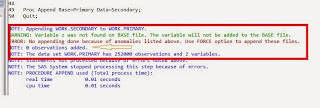
Case: 1:-
Now if we use FORCE option then it will force to run PROC APPEND and FORCE would drop or truncate the variable as per the Base dataset (Primary).
Proc Append Base=Primary Data=Secondary FORCE;
Quit;


Data would be added to the primary dataset after truncating or dropping the extra variable in secondary dataset as per primary dataset.
Case: 2:- What if our Secondary dataset would have fewer variables than Primary dataset?
FORCE option would force to run PROC APPEND and it will assign missing values for the missing variable’s observation in appended dataset from where secondary dataset have values.
Primary dataset – 3 variables (X, Y, Z) – 252000 observations
Secondary dataset – 2 Variables (X, Y) – 48000 observations
Code:
Proc Append Base=Primary Data=Secondary FORCE;
Quit;
Log:

Result:

FORCE option in PROC APPEND has concatenated both dataset and assigned missing values to missing variables observation in secondary data set with respect to primary data set.
We are familiar with PROC APPEND in SAS to upload data to the data warehouse and it’s attributes, Kindly refer to : Difference Between Set Statement And Proc Append In SAS For Appending Data
FORCE option: As per its name, it forces PROC APPEND to concatenate or add or append the data sets in some conditions in which the append procedure would normally fails like: when data sets contains different variables, formats, Lengths and labels.
PROC APPEND without FORCE option (Using different variables in datasets):
Suppose we have two datasets named as Primary and Secondary.
Primary Dataset – 3 Variables (X, Y,Z ) – 252000 observations
Secondary Dataset – 2 Variables (X, Y) - 48000 observations
Now we run the following code:
Proc Append Base=Primary Data=Secondary;
Quit;
We would get error due to non matching variables in Datasets. Error would be thrown only if Base data set would have different rather than secondary dataset.

Case: 1:-
Now if we use FORCE option then it will force to run PROC APPEND and FORCE would drop or truncate the variable as per the Base dataset (Primary).
Proc Append Base=Primary Data=Secondary FORCE;
Quit;


Data would be added to the primary dataset after truncating or dropping the extra variable in secondary dataset as per primary dataset.
Case: 2:- What if our Secondary dataset would have fewer variables than Primary dataset?
FORCE option would force to run PROC APPEND and it will assign missing values for the missing variable’s observation in appended dataset from where secondary dataset have values.
Primary dataset – 3 variables (X, Y, Z) – 252000 observations
Secondary dataset – 2 Variables (X, Y) – 48000 observations
Code:
Proc Append Base=Primary Data=Secondary FORCE;
Quit;
Log:

Result:

FORCE option in PROC APPEND has concatenated both dataset and assigned missing values to missing variables observation in secondary data set with respect to primary data set.
We are familiar with PROC APPEND in SAS to upload data to the data warehouse and it’s attributes, Kindly refer to : Difference Between Set Statement And Proc Append In SAS For Appending Data

