Showing posts with label SAS FUNCTIONS. Show all posts

What Is The Difference Between SAS Character Functions INDEX And INDEXC

In my previous post related to, how to read mixture dates from raw data in sas, I have used INDEXC function so it’s a good time to define INDEX and INDEXC function in SAS with difference in both.

link to previous post :How To Read Different Formats Of Dates In SAS (Reading Mixture DatesFrom Raw Data In SAS )

INDEX Function : It looks for a character expression in a character string and returns the position of string’s first character for the first position. In short, it scans the string and provides the location of sub-string.

INDEXC Function : It looks for a expression for any of the given characters and returns the position of that expression. In Short, It scans the string and provides the location of sub-string based on list of expression in sub-string.

Explanation : Suppose we have a character string “UmAShankerSaini” and we are looking for ‘ain’.

Once we are running INDEX function, then it would search for complete string like ‘ain’ and it would return the position of it, which is 12.

Once we are running INDEXC function, then it would make a list of all letters in specified string and returns the position of any character for the first instance of any of them. So when it comes to lowercase ‘a’ at the sixth character, it returns the position value which is 6.  In case of uppercase ‘A’, it would return 3.

Data DSN;
Name='UmAShankerSaini';
Exp='ain';
Indx=Index(Name,Exp);
IndxC=INDEXC(Name,Exp);
Put Indx= / Indxc = ;
Run;


How To Read Different Formats Of Dates In SAS (Reading Mixture Dates From Raw Data In SAS)

Today we are going to discuss about, how to read dates in SAS, which are in multiple format in raw data.

Suppose we have dates in raw data which contains multiple types of separators and formats.

We would read such type of mixed date data and make all dates in one required format. We have two master blaster functions to perform this task :INDEXC and WORDDATE

SAS Code would be as follows:

Data DSN;

Input @1 Dummy_Dates $15.;

If INDEXC (Dummy_Dates,'-/:') NE 0

Then Date=Input(Dummy_Dates,MMDDYY10.);

Else Date=Input(Dummy_Dates,Date9.);

Format Date WORDDATE.;

Drop Dummy_Dates;

Cards;

10/07/2014

10MAY1984

8-12-1999

1:09:60

;
Run;


For more on INDEXC : What Is The Difference Between SAS Character Functions INDEX And INDEXC

ANY Function For Data Cleaning In SAS : ANYALNUM, ANYALPHA, ANYDIGIT,ANYPUNCT, ANYSPACE

We have some more SAS character functions for data cleaning. We can call this group of SAS Functions as "ANY" function group.

We can use given functions to search digits, alphanumeric (upper and lower cases, letters and digits), alpha (completely character), punctuation characters and space characters (tab, blanks, line feeds).

For these SAS Character functions you must be familiar with LOCALE and TRANTAB SAS System options.

ANYALNUM Function: It gives the first position of alphanumeric character from a variable after searching for a alphanumeric character string in a character variable.

Syntax:  Any_Alnum = ANYALNUM (String,Start_Position);


ANYALPHA Function: It gives the first position of an alphabetic character from a variable after searching for a alphabetic character string in an character variable.

Syntax: Any_Alpha=ANYALPHA (String,Start_Position);


ANYDIGIT Function: It gives the first position of a digit from a character string after searching for any digit in character variable.

Syntax: Any_Digit=ANYDIGIT (String,Start_Position);


ANYPUNCT Function: It gives the first position of a punctuation character from a character string after searching for punctuation in character variable.

 Syntax: Any_Punct=ANYPUNCT (String,Start_Position);


ANYSPACE Function: It gives the first position of a white – space character (Horizontal and Vertical tab, Blank, Carriage, line feed and form feed) from a character string after searching for a white-space in character variable.

Syntax: Any_Space=ANYSPACE (String,Start_Position);

  •   String: Could be any variable, any expression to search and any character constant

  •  Start_position: Any optional integer which tells about the position from which the search should start and some time the direction to start

  •  If you want that search should be right aligned, then Start_Position value should be positive

  •  In the same way if Start_Position value is negative, then search would be proceeds to the left

These functions would return a value zero if any following is true:

  •  If searching character not found

  •  If the value of Start_Position is more than the length of the String

  •  If value of Start_Position is equals to zero

Combined code for all above functions in one shot:

Data DSN;

Input Practice $26.;

Alpha_Num=ANYALNUM (Practice);

Alpha_Num_L=ANYALNUM (Practice,-999);

Alpha=ANYALPHA (Practice);

Alpha_L=ANYALPHA (Practice,-999);

Digit=ANYDIGIT (Practice);

Digit_L=ANYDIGIT (Practice,-999);

Punct=ANYPUNCT (Practice);

Space=ANYSPACE (Practice);

Cards;

My Employee Id is 5001710

Brawvo ! well done

1357924680

;

Run;

  •  DSN is the name of the Dataset

Example:  How could we use these functions for data cleaning

Data Alpha_only Mixed Punct;

Input Practice $26.;

If Anydigit (Practice) then output mixed;

If Anypunct (Practice) then output Punct;

Else output Alpha_only;

Cards;

My Employee Id is 5001710

Brawvo ! well done

1357924680

;

Run;

  •  Alpha_only, Mixed and Punct are newly created data set

SAS Functions - LOWCASE, UPCASE and PROPCASE Function ( SAS Characterfunction )

LOWCASE Function: It converts all letters to LOWER CASE of any character constant, Variable or Expression. It is a character function.

We can say that LOWCASE function converts all letters of any arguments to lowercase letters.

Syntax:  LOW_CASE=Lowcase(X);


UPCASE Function: It converts all letters to UPPER CASE of any character Constant, Variable or Expression. It is a character function.

We can say that UPCASE function converts all letters of any arguments to UPPERCASE letters.

Syntax: UP_CASE=Upcase(x);


PROPCASE Function: It converts all letters in PROPER CASE of any character constant, Variable or Expression. It is a character function.

We can say that PROPCASE function converts the words of any arguments into the PROPERCASE Words.

 Syntax:  PROP_CASE=Propcase(X);

 Combined code for all above function :

 Data DSN;

X='UmA ShANkeR saINI';

UP_CASE=Upcase(x);

LOW_CASE=Lowcase(X);

PROP_CASE=Propcase(X);

Run;


And the output would be as follows :

 *  DSN is the name of the Dataset

These function are not designed for SBCS, DBCS and MBCS character encoding

SAS Character Function- Compress and Compbl

Hi,

Here we have some more character function for data cleaning. It means to get rid off from the unwanted data / characters from our data or string, that character could be special characters like : ?,!,@,#,$ and many more..

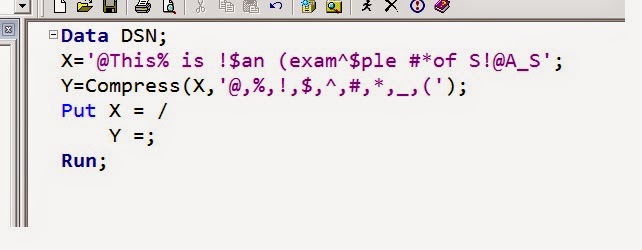
COMPRESS function in SAS: It removes or suppresses all mentioned special characters from character string and return the desired character string.

Syntax:  Compress (string, ‘unwanted characters’, ‘Modifiers’);

Data DSN;

X='@This% is !$an (exam^$ple #*of S!@A_S';

Y=Compress(X,'@,%,!,$,^,#,*,_,(');

Put X = /

Y =;

Run;


Just add all the unwanted character into the second argument with comma (,) and it would get removed from your variable.

  •  String – a character constant, any expression which resolves to character, character variable

  • Unwanted character- here we can mention all the character which needs to be removed

  • For Data step, Length of the returned variable from COMPRESS function would be equal to the variable’s lengths given in the first argument, if length is not assigned to new variable

  • COMPRESS function also allows null arguments, any null arguments would be treated as string if it has a zero length

  • Returned variable type for COMPRESS function would always as character

  • COMPRESS function removes each and every incidence from the specified character string. If we specify a blank as a character to delete from string then COMPRESS function would delete all blanks from source variable

  • If we want to use modifiers and we not specifying any second argument, then we need to use two commas together which would indicate that the modifier is the third argument

Modifiers - A variable, character constant or any expression which modifies the action of compress function. Some of the useful modifiers are given below:

A: It adds alphabetic characters to the list of characters to be deleted

D: It adds digits to the list of the characters to be deleted

I: It tells to ignore the case of characters to be deleted or kept

K: It keeps the listed character instead of removing them

N: It adds digits and underscores character

L:  It adds all lower case character to the list of character to be deleted or kept.

P: It adds all the punctuation marks to the list of character to be deleted.

U: It adds all the uppercase letters to the list of character

W: It adds all the printable character to the list of character

Suppose we want to retain some digits as well in our string then we need to use some modifiers like it :

Data DSN;

X='@This% is !$an (exam^$ple #*of S!@AS 12345';

Y=Compress(X,' ','KN');

Put X = /

Y =;


COMPBL function: This function removes extra blanks or multiple blanks from a character string by assuming each incidence of two or more consecutive blanks into a single blank

Syntax : COMPBL (argument);

Data DSN;

X='Uma   Shanker        Saini';

Y=COMPBL(X);

Put X =  /

Y= ;

Run;


  • Argument specifies to a variable, any character constant, expression to compress or any valid expression which would evaluates to character string

  • For Data step, Length of the returned variable from COMPBL function would be equal to the variable’s lengths given in the first argument, if length is not assigned to new variable

  • COMPBL function also allows null arguments, any null arguments would be treated as string if it has a zero length

  • Returned variable type for COMPBL function would always as character

  • COMPBL function removes multiple blanks only from the source variable and there would be no effect on single blank

SAS Date Function And SAS Time Function

Hi,

Most of the time we have date in a format which contains time as well. We call it as datetime or datetime stamp. It means we are going to deal with a date which also contains time.

What could we do if we want only a specific part from given datetime stamp....

Suppose we have a variable which is containing the datetime stamp and we need to schedule the job as per the time only or in simple case we just want to make some more variables from it like date, time, hour, month and second as well.

Here we go :

For example we are taking date and time as : 26SEP97:01:47:37AM

you guys can create the main variable by using datetime() function. Just do as per the code:

Data DSN;

                                                      When=datetime();

                                                      Date=datepart(when);

                                                      Time=timepart(when);

                                                      Day=day(date);

                                                      Month=Month(date);

                                                      Year=year(date);

                                                      Hour=Hour(time);

                                                      Minute=minute(time);

                                                      Second=second(time);

                                                      Qtr=qtr(date);

                                                      Format when nldatm. date date9. time timeAMPM.;

                                                      Run;


* DSN is the name of the data set.

* Our main variable is 'When'.

* NLDTM., DATE9., TIMEAMPM. are the formats

And the result would be as follows:

In data step, what ever we wrote at the left hand side that are the variables and on the right hand side all are the function with the same name as variable.

we can also use following functions :

QTR     -  To extract quarter of the year from date.

WEEK  -  To get to know the week of the year from date.

WEEKDAY - To get the day of the week from date.

* Whenever we import data to the SAS from .txt file means if we ae using proc import to import .txt file, it's a good practice to use SAS System option Datestyle. It would put your datetime in required format.

Ex :    Options DATESTYLE = MDY;

It would read the data in sequence of Month, Day and Year when ANYDATE informat is given to the data.

Concatenation Functions In SAS : CAT, CATT, CATS, CATX, CATQ

Hi All,

Today i am explaining something about to add two or more character strings in SAS. Adding two or more character or string which simply notify towards the CONCATENATION.

We can simply define concatenation as to put two or more strings together is concatenation. Here we would not discuss about the concatenation operators which are || (vertical bar) and !! (Exclamation mark ) but we would discuss on some concatenation functions in SAS which are CAT, CATT, CATQ, CATS and CATX.

All the Concatenation functions takes two or more arguments and concatenate the strings or variables. For all concatenation functions (if applies) removes the leading or trailing blanks from resultant concatenated string before the concatenating of strings.

Note : Whenever we use concatenation operator || or !!, The Length of the resultant string would be the sum of the lengths of all individual strings we are adding or concatenating.

CAT Function in SAS : It concatenates the two or more character strings and does not remove leading or trailing blanks. The resultant concatenated string would be a character string.

Syntax : Result_cat =CAT (String1, String2,.....StringN);

CATT Function in SAS : It concatenates the two or more character strings and removes trailing blanks from the resultant string or variable. The resultant concatenated string would be a character string.

Syntax : Result_catt =CATT(String1, String2,.....StringN);

CATS Function in SAS : It concatenates the two or more character strings and removes all leading and trailing blanks from the resultant string or variable. The resultant concatenated string would be a character string.

Synatax : Result_cats =CATS(String1, String2,.......StringN);

CATX Function in SAS : it concatenates the two or more character strings and adds a delimiters after each string's value. It also removes leading and trailing from resultant string or variable. The resultant concatenated string would be a character string. We can say that CATX is same as CATS just it adds a delimiter between values being concatenated.

Syntax: Result_catx=CATX('Delimiter', String1, String2,,..... , StringN);

CATQ Function in SAS : It concatenates the two or more character or numeric strings by adding a delimiter and quotation mark to that string which contain the delimiter. CATQ function is similar to the CATX function excepts it also adds quotation marks.

Syntax: Result_catQ=CATQ(Modifier,'Delimiter',String1, String2,.....StringN);

Modifiers for CATQ function:-

  1. 1 or ' : For single quotation mark

  2. 2 or " : For double quotation mark

  3. a or A : For adding quotation mark to all of the arguments

  4. c or C : For comma as a delimiter

  5. d or D : Tells that we have specified delimiter argument

  6. h or H : For horizontal tab as a delimiter

For all concatenate functions:-

  • The Default LENGTH of returned variable from any CAT* function would be 200 bytes, if Length is not previously specified to the assigned variable of CAT function

  • CAT* function always returns a value to a variable

  • For numeric variables / arguments, CAT* function removes trailing and leading after formatting numeric arguments to the BESTw. format

  • The returned values from CAT, CATS, CATT and CATX are normally equivalent with the resultant values of concatenation operator (with certain combination like : Trim, Left, Strip) except in length

  • CAT, CATS,CATT and CATX functions are faster than using TRIM and LEFT functions

  • In CATQ, if we do not use C,D or H as modifiers, then CATQ would use blank as delimiter